
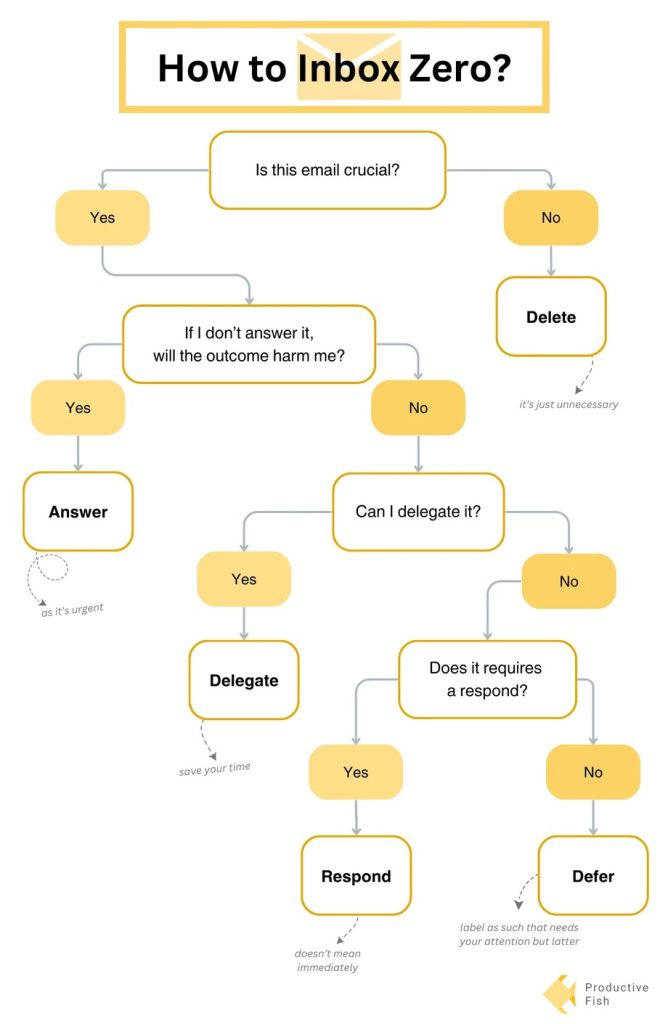
Email organization is the cornerstone of a productive workday. A cluttered inbox can quickly become a source of stress and hinder your ability to focus on important tasks. This guide dives deep into strategies for organizing your emails, achieving Inbox Zero, and ultimately, maximizing your productivity. We’ll explore practical techniques, actionable tips, and real-world examples to help you take control of your inbox and reclaim your time. This article will be structured into sections that address different aspects of email management, starting with setting up a system and moving through to strategies for specific situations. We will also touch on tools you can use to automate and streamline the process.
Setting Up Your Email Organization System
Understanding Your Needs
Email organization isn’t a one-size-fits-all solution. Understanding your unique email habits and workflows is crucial. What types of emails do you receive frequently? How many emails do you receive daily? Take time to analyze your email behavior and identify patterns. This will help you to tailor your system to your particular needs. Consider if you need a system that filters and routes important messages automatically, or one that helps you move through emails in a way that makes you feel most in control.
Defining Your Email Categories
One of the most important steps to take is to define your email categories. Are you receiving lots of emails that are similar? For example, are you receiving many emails for similar projects or tasks? If so, creating an overarching category for all emails related to that project will keep everything in one place. For example, if you have several email threads related to planning a conference, categorizing those messages as “Conference Planning” will make them easily accessible.
Prioritizing Email Folders and Tags
Prioritize emails based on their urgency and importance. Implement a system for tagging, flagging, or even using color-coding to highlight the most important emails. This could be done based on the sender, subject line, or priority level. This will allow you to quickly locate crucial emails and act on them without delay, helping you get a grasp on your email overload. For instance, emails from your boss or clients should be prioritized higher than general inquiries.
Implementing Email Filters and Rules
Utilizing Filters and Rules
Automate the process of sorting and routing emails using filters and rules. This can free up your time for more pressing tasks. Set up rules to automatically move certain emails to specific folders or labels, based on sender, subject line keywords, or the specific action that needs to be taken. This allows you to avoid spending valuable time manually categorizing emails. This will allow you to see email streams that can be worked on in a batch, to maximize your productivity.
Creating Email Templates
Consider creating email templates for common responses or communications. Using templates streamlines the process of responding to emails, especially for repetitive tasks. A well-structured template makes your responses professional and efficient, and they can be used over and over. Consider using templates for emails like welcome emails, follow-up emails, or thank-you notes. This will allow you to remain efficient and professional without having to spend time crafting each individual message. For instance, if you send an email to a large list of people asking for information for a project, you can create a template, fill in the missing information, and send the message out in bulk.
Managing Incoming Emails and Scheduling
Managing Large Incoming Email Volumes
Learn how to effectively manage large volumes of emails. The goal is to be proactive and preventative. What are strategies for dealing with emails that are flooding your inbox? Consider using a combination of filters, rules, and categorization strategies. Implementing automated systems, such as forwarding emails to a specific location or using email organization apps, can significantly improve management. For example, if you receive daily summaries or newsletters, create a folder or tag for these to keep them from overwhelming your main inbox.
Scheduling Email Responses and Actions
Scheduling tasks helps you stay organized and prioritize tasks effectively. If you have a large number of emails and want to be sure you don’t miss anything important, put the task on your calendar, or use a task management application. Scheduling time blocks to address emails based on urgency or importance can further increase productivity. For example, set aside an hour each day to respond to high-priority emails, then move on to emails that are less urgent.
Advanced Techniques for Organization
Utilizing Email Management Tools
Email management tools can greatly streamline the process of organizing emails. These apps can help you automate tasks, categorize emails, and even provide insights to your email workflow. Using tools like these can free up a lot of time that would otherwise be spent manually sorting and organizing your emails. Look for apps that offer features like filtering, tagging, and categorization, as well as advanced features to manage various email streams.
Implementing a Dedicated System for Important Emails
Establish a dedicated system for handling important emails. This helps prevent them from getting lost in your inbox. Create specific filters, folders, or tags for important emails. Categorize emails by sender, subject, or topic. Include clear labels or tags. For instance, set up a “Projects” folder and use tags like “high priority” for urgent emails. This way, important emails are organized and easily located.
Maintaining Inbox Zero
Regular Review and Deletion
Implement a system for reviewing and deleting emails, to avoid accumulating unhandled messages. Schedule time each day, or each week, to review and categorize incoming and existing emails. Regularly going through your inbox and deleting or archiving messages that are no longer relevant can keep your inbox clutter-free. Identify patterns and adapt your strategies to best fit your unique email patterns.
Utilizing Archiving and Trashing
Make use of archiving and trashing features. Archiving will keep emails that you don’t need to access in a timely manner but do need in the future, such as emails from clients for ongoing projects. By using a combination of these, you will be able to get the most from your inbox and increase productivity. Remember to delete emails that are no longer useful or needed.
Strategies for Handling Specific Situations
Dealing with Promotional Emails
Create specific filters or folders for promotional emails. This keeps your inbox cleaner and ensures that important emails don’t get missed. Using a “Promotions” or “Spam” folder will help manage this. Unnecessary emails can lead to clutter, so ensure that all unimportant emails are categorized or archived properly.
Managing High-Priority Emails
Prioritize high-priority emails. Use flags, labels, or dedicated inboxes for these emails. High-priority emails should be handled as soon as possible. Use a system that alerts you to those important emails as they come in, and have a designated time set aside for handling these emails.
Staying Organized Over Time
Regular Reviews and Adjustments
Regularly review your email organization system and make adjustments as needed. Assess if your system is still effectively supporting your workflow. Consider whether any changes need to be made to maintain inbox zero. Changes might include adjusting filters, categories, or other strategies. This is an ongoing process that requires continual refinement.
Adaptability to Your Changing Needs
Adjust your strategies to support your needs and workflows as they evolve. Make sure that your email organization system is keeping up with the changes of the job.
In conclusion, mastering email organization is crucial for productivity and well-being. By implementing the strategies discussed in this guide, you can reclaim your time and focus on what truly matters. Prioritize, categorize, and automate; these are the cornerstones of a successful email organization. Remember to adjust your approach based on your specific needs and workflow. Ready to take control of your inbox and boost your productivity? Start by identifying your current email management habits and planning your implementation steps. We’ve provided a comprehensive framework to help you achieve Inbox Zero and stay organized!